Documentation
Directory Structure Assumptions and Conventions
When you run the analyzer on Stack_Template.co, it assumes that directories named RESOLVE and Main exist above the level of Stack_Template.co. It will look in the directory tree defined by RESOLVE/Main for any files that Stack_Template.co depends on; it will also not look outside of the Main directory. Place modules in directories according to the following rules:- Math Units (*.mt files), Concepts (*.co files), and Facilities (*.fa files) can appear anywhere beneath Main
- Realizations (*.rb files) and Enhancements (*.en files) must appear in the same directory as their associated Concept.
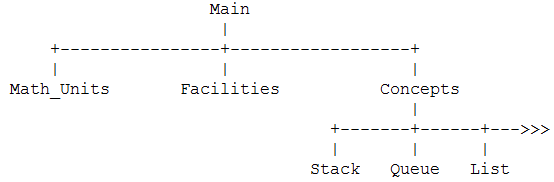
where Stack, Queue, and List are example directories used to illustrate the fact that each concept gets its own directory.
Translating Mathematical Symbols to Text
The modules in the course notes are written using mathematical symbols. Perhaps someday we will have a fancy editor for the RESOLVE language that allows one to type in mathematical symbols - perhaps. For now, all input files to the analyzer must be text only. Compare Stack_Template and Array_Realiz in the course notes with Stack_Template.co and Array_Realiz.rb in the Main/Concepts/Stack directory. This should give you enough information about the symbol-to-text translation to allow you to complete project #1.Examples:
The text version of the correspondence clause for an Array_Realiz is:
|
correspondence Conc.Q = (Concatenation
i: Integer where 1 <= i <= Q.Last, <Q.Contents(i)>); |
Note that the parentheses around the concatenation expression are mandatory.
Notes and Errata
-
NEW To write the main procedure in the top level facility,
use the following outline:
Facility Stack_Queue_User_Facility;
(* Facility declarations go here. *)
Operation Main();
Procedure
(* Variable declarations and procedure body go here. *)
End Main;
end Stack_Queue_User_Facility;
-
Remember that parentheses are mandatory around Concatentation expressions.
-
To assign a truth value to a boolean programming variable, use the operations
True() and False() found in Boolean_Template. For example, to assign a value
of true to the variable x, write:
x := True();
-
The keywords constraints and conventions may be singular or plural - the
analyzer does not discriminate between the singular and plural forms.
-
In a Type declaration, the keyword phrase is represented by may be replaced
with an equal sign (=).
-
The specification of Defensive_Push is given on page 42 of the class notes. Here is the
specification in text:
Operation Defensive_Push(alters E: Entry;
updates S: Stack;
replaces full_flag: Boolean);
ensures (if |#S| < Max_Depth then S = <#E> * #S
and not full_flag and
(if |#S| = Max_Depth then full_flag);
-
There is a discrepency between the course notes (Figure 6 on page 67) and the current
version of the analyzer. In the notes a procedure can be distinct from an operation
within the same facility:
Operation Copy_Integer(replaces C: Integer;
preserves Orig: Integer;
ensures C = Orig;
-- Any amount of code can go here --
Procedure Copy_Integer(replaces C: Integer;
preserves Orig: Integer;
C = Replica(Orig);
end;
Operation Copy_Integer(replaces C: Integer;
preserves Orig: Integer;
ensures C = Orig;
Procedure Copy_Integer(replaces C: Integer;
preserves Orig: Integer;
C = Replica(Orig);
end;